

工具介绍
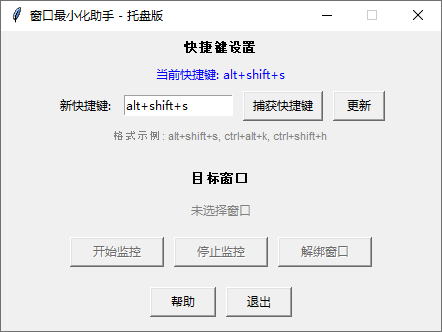
这是一个由Python编写的窗口最小化工具,支持设置指定窗口,在我们鼠标移动到窗口外时,自动最小化此窗口。其界面如下:
下载链接:
下载地址
使用方法
1、首先根据自身情况设置快捷键(因为不同电脑对快捷键的占用情况不同,所以可以自行设置快捷键)。默认使用的alt+shift+s ,如果需要其他的可以自己输入新快捷键后更新。
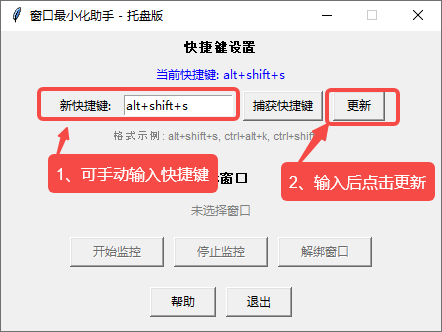
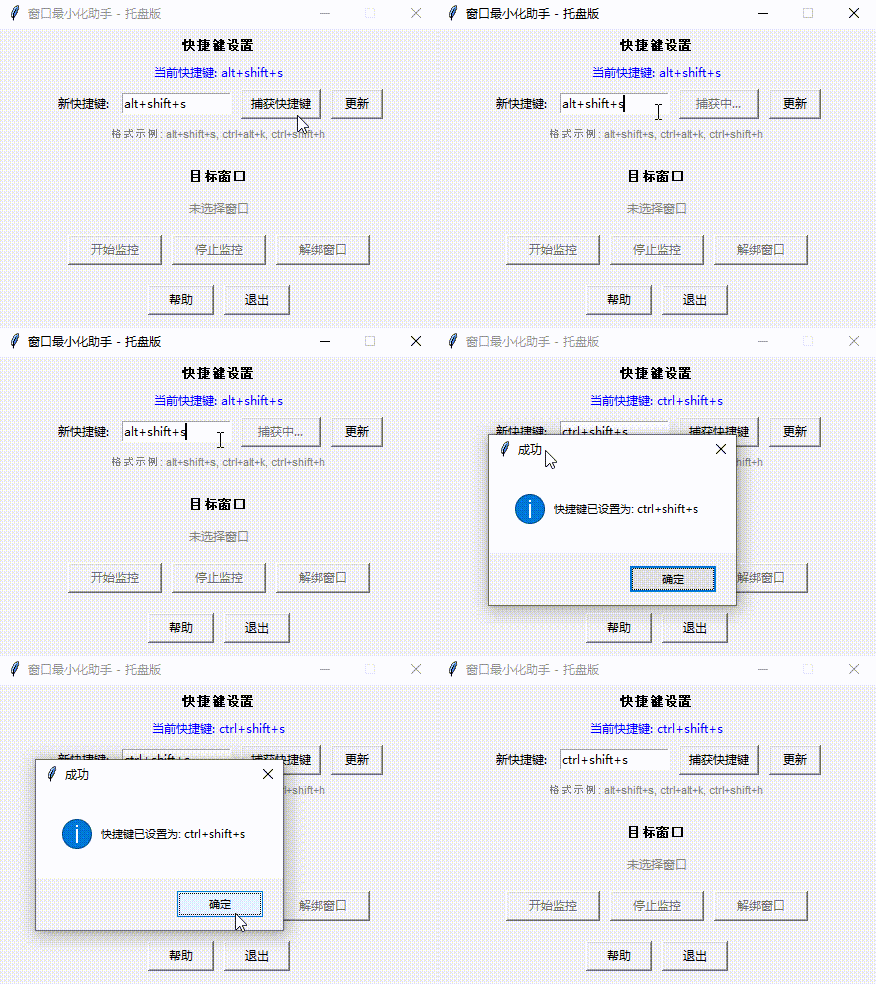
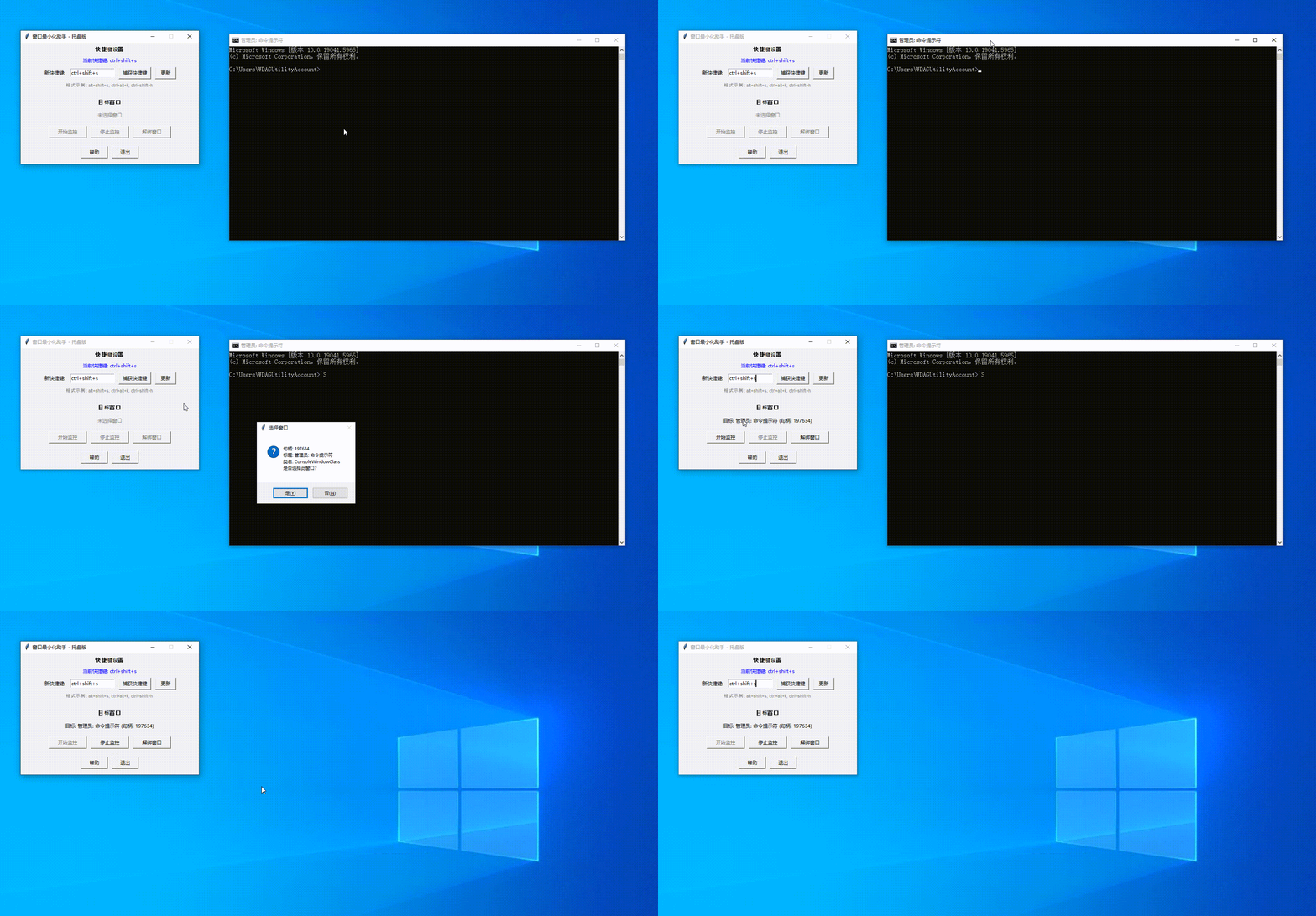
或者点捕获快捷键后按快捷键让程序自动识别,可以参考下面的GIF。
2、设置后,可以移动到我们需要设置的窗口,然后按我们设置的快捷键,就会弹出是否设置,设置即可。然后点击开始监控,就自行运行了。
注意:提示窗口可能会被遮挡,按快捷键后,可以点击一下窗口小助手,然后看是否有提示框。
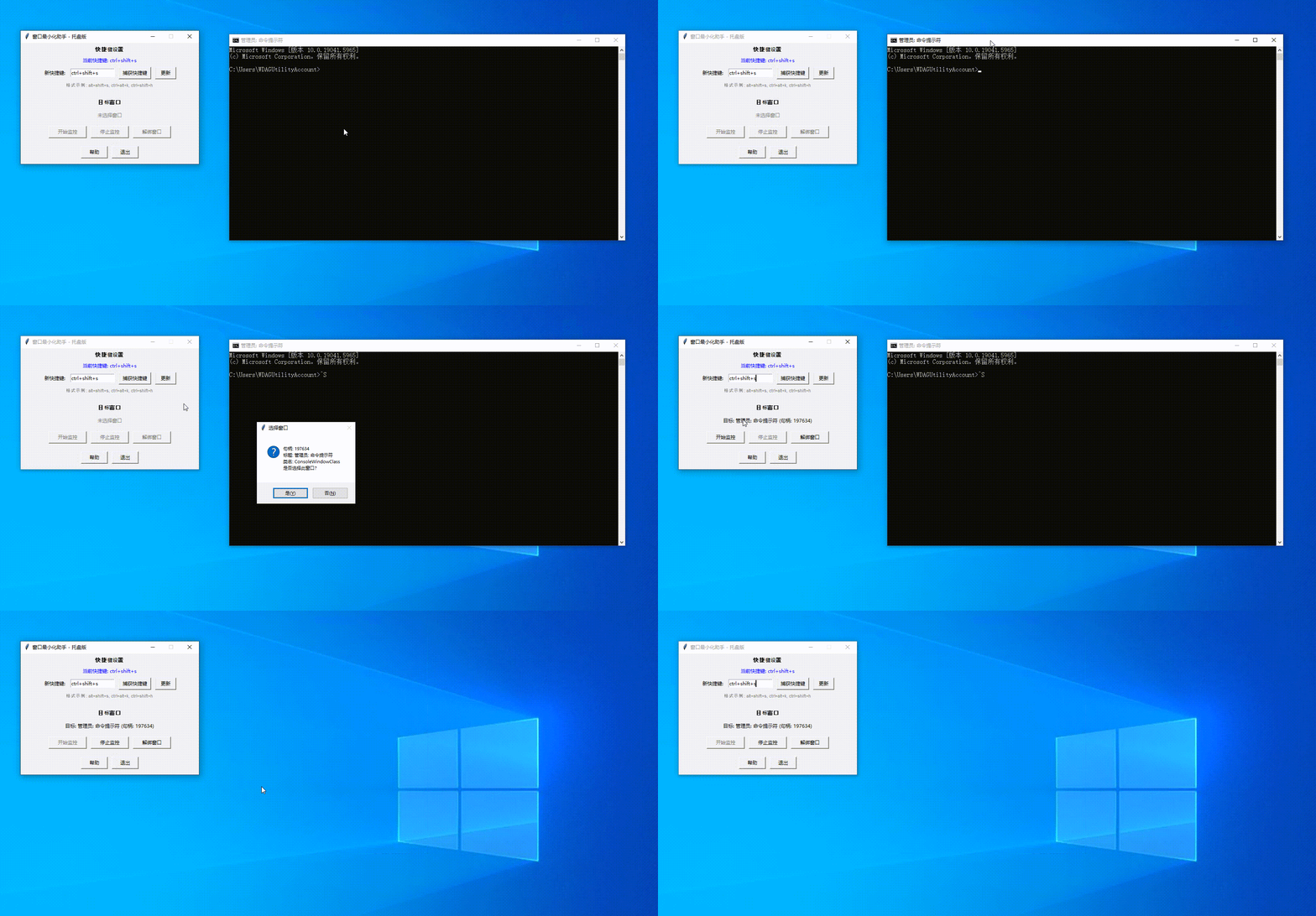
3、如果要停止自动最小化操作,点击停止监控就行。
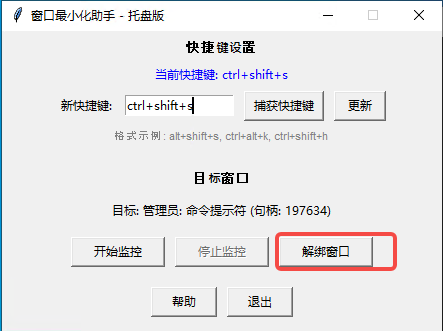
4、窗口绑定后,再使用快捷键是无效的,需要解除绑定后再使用快捷键绑定。
如果窗口关闭了,会自动解绑,重新打开的窗口需要重新绑定
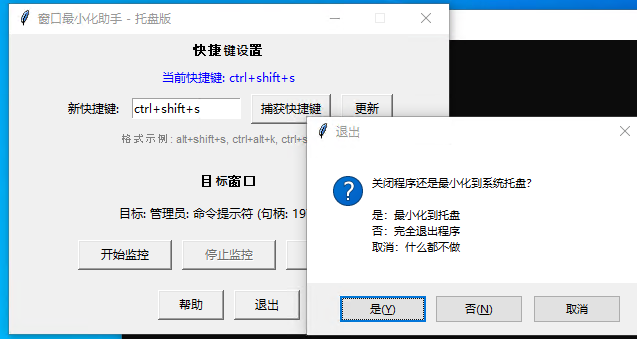
5、窗口还支持最小化功能,点击关闭会自动弹出是否最小化,根据提示使用即可
6、最小化后,支持右键和左键,左键重新打开窗口,右键有开关监控+显示界面+退出功能。就不做更多介绍了。
源码
因为源码较长,点击展开显示
"""
窗口最小化助手(完整版)
功能:
- 通过全局快捷键拾取鼠标下窗口作为目标(默认 Alt+Shift+S)。
- 监控鼠标行为:进入目标窗口再离开时自动最小化。
- 支持自定义快捷键:可手动输入或通过“捕获快捷键”按钮直接按下组合键。
- 检查快捷键是否被占用,冲突时给出提示。
- 支持最小化到系统托盘,托盘右键菜单包含:开始监控、停止监控、打开界面、退出。
- 托盘左键单击直接打开界面。
- 解绑功能:解除当前绑定的目标窗口,快捷键再次可用。
- 目标窗口关闭时自动解绑,无提示。
- 关闭主窗口时提示:最小化到托盘 或 完全退出。
- 内置帮助界面,显示使用步骤,且帮助窗口相对于主窗口居中弹出。

依赖安装:
    pip install pywin32 keyboard pystray pillow
"""

import tkinter as tk
from tkinter import messagebox
import win32gui
import win32con
import win32api
import keyboard
import pystray
from PIL import Image, ImageDraw
import threading
import sys


class MiniMizeOnLeaveApp:
    def __init__(self, root):
        self.root = root
        self.root.title("窗口最小化助手 - 托盘版")
        self.root.geometry("440x300")
        self.root.resizable(False, False)

        # 目标窗口句柄
        self.target_hwnd = 0
        # 监控开关
        self.monitoring = False
        # 鼠标当前是否在目标窗口内
        self.mouse_inside = False
        # 本次会话是否发生过“进入”事件
        self.has_entered = False

        # 全局热键相关
        self.hotkey_handler = None          # 当前注册的热键对象

        # 捕获快捷键相关
        self.capturing = False               # 是否正在捕获按键
        self.capture_hook = None              # 捕获钩子
        self.pressed_keys = set()             # 当前按下的键
        self.last_valid_combo = None          # 最后有效的组合键

        # 系统托盘相关
        self.tray_icon = None
        self.tray_thread = None
        self.create_tray_icon()              # 创建托盘图标(在后台线程运行)

        # 绑定窗口关闭事件
        self.root.protocol("WM_DELETE_WINDOW", self.on_closing)

        # ===== 界面布局 =====
        # 1. 快捷键设置区域
        tk.Label(root, text="快捷键设置", font=('Arial', 10, 'bold')).pack(pady=5)

        self.hotkey_label = tk.Label(root, text="当前快捷键: 未设置", fg="blue")
        self.hotkey_label.pack()

        hotkey_frame = tk.Frame(root)
        hotkey_frame.pack(pady=5)

        tk.Label(hotkey_frame, text="新快捷键:").pack(side=tk.LEFT, padx=5)
        self.hotkey_entry = tk.Entry(hotkey_frame, width=15)
        self.hotkey_entry.pack(side=tk.LEFT, padx=5)
        self.hotkey_entry.insert(0, "alt+shift+s")   # 默认值

        self.btn_capture = tk.Button(hotkey_frame, text="捕获快捷键", command=self.start_capture, width=10)
        self.btn_capture.pack(side=tk.LEFT, padx=5)

        self.btn_set_hotkey = tk.Button(hotkey_frame, text="更新", command=self.update_hotkey, width=6)
        self.btn_set_hotkey.pack(side=tk.LEFT, padx=5)

        # 提示信息
        tk.Label(root, text="格式示例: alt+shift+s, ctrl+alt+k, ctrl+shift+h",
                 fg="gray", font=('Arial', 8)).pack()

        # 2. 窗口选择信息区域
        tk.Label(root, text="\n目标窗口", font=('Arial', 10, 'bold')).pack(pady=5)
        self.target_label = tk.Label(root, text="未选择窗口", fg="gray", wraplength=350)
        self.target_label.pack(pady=5)

        # 3. 控制按钮区域(三列布局)
        btn_frame = tk.Frame(root)
        btn_frame.pack(pady=10)

        self.btn_start = tk.Button(btn_frame, text="开始监控", command=self.start_monitoring,
                                   state='disabled', width=12)
        self.btn_start.pack(side=tk.LEFT, padx=5)

        self.btn_stop = tk.Button(btn_frame, text="停止监控", command=self.stop_monitoring,
                                  state='disabled', width=12)
        self.btn_stop.pack(side=tk.LEFT, padx=5)

        self.btn_unbind = tk.Button(btn_frame, text="解绑窗口", command=self.unbind_window,
                                    state='disabled', width=12)
        self.btn_unbind.pack(side=tk.LEFT, padx=5)

        # 4. 底部按钮(帮助和退出)
        bottom_frame = tk.Frame(root)
        bottom_frame.pack(pady=10)
        self.btn_help = tk.Button(bottom_frame, text="帮助", command=self.show_help, width=8)
        self.btn_help.pack(side=tk.LEFT, padx=5)
        self.btn_exit = tk.Button(bottom_frame, text="退出", command=self.exit_app, width=8)
        self.btn_exit.pack(side=tk.LEFT, padx=5)

        # 注册默认热键
        self.register_default_hotkey()

    # ---------- 系统托盘相关 ----------
    def create_tray_icon(self):
        """创建系统托盘图标(在独立线程中运行)"""
        def on_click(icon, item):
            # 右键菜单点击回调
            if item.text == "开始监控":
                self.root.after(0, self.start_monitoring)
            elif item.text == "停止监控":
                self.root.after(0, self.stop_monitoring)
            elif item.text == "打开界面":
                self.root.after(0, self.show_window)
            elif item.text == "退出":
                self.root.after(0, self.quit_app)

        # 创建托盘图标菜单
        menu = pystray.Menu(
            pystray.MenuItem("开始监控", on_click, enabled=lambda item: not self.monitoring),
            pystray.MenuItem("停止监控", on_click, enabled=lambda item: self.monitoring),
            pystray.MenuItem("打开界面", on_click, default=True),
            pystray.MenuItem("退出", on_click)
        )

        # 生成一个简单的图标图像(使用 PIL 创建纯色图标)
        image = Image.new('RGB', (64, 64), color=(0, 120, 215))
        draw = ImageDraw.Draw(image)
        draw.rectangle((16, 16, 48, 48), fill=(255, 255, 255))
        draw.text((20, 20), "W", fill=(0, 0, 0))

        # 创建托盘图标,并设置左键点击直接打开界面
        self.tray_icon = pystray.Icon(
            "window_mini_helper",
            image,
            "窗口最小化助手",
            menu,
        )

        # 在后台线程中启动托盘图标
        self.tray_thread = threading.Thread(target=self.tray_icon.run, daemon=True)
        self.tray_thread.start()

    def show_window(self):
        """显示主窗口"""
        self.root.deiconify()
        self.root.lift()
        self.root.focus_force()

    def hide_window(self):
        """隐藏主窗口到托盘"""
        self.root.withdraw()

    def on_closing(self):
        """处理窗口关闭事件(点击X按钮)"""
        result = messagebox.askyesnocancel("退出", "关闭程序还是最小化到系统托盘?\n\n"
                                          "是:最小化到托盘\n否:完全退出程序\n取消:什么都不做")
        if result is True:   # 最小化到托盘
            self.hide_window()
        elif result is False: # 完全退出
            self.quit_app()
        # else: 取消,不执行任何操作,窗口保持打开

    def quit_app(self):
        """完全退出程序(清理资源)"""
        # 注销热键
        if self.hotkey_handler:
            keyboard.remove_hotkey(self.hotkey_handler)
        # 停止监控
        self.monitoring = False
        # 如果正在捕获,取消钩子
        if self.capturing and self.capture_hook:
            keyboard.unhook(self.capture_hook)
        # 停止托盘图标(这会退出托盘线程)
        if self.tray_icon:
            self.tray_icon.stop()
        # 销毁主窗口
        self.root.quit()
        self.root.destroy()
        sys.exit(0)

    # ---------- 解绑功能 ----------
    def unbind_window(self, show_message=True):
        """解除当前绑定的目标窗口,停止监控"""
        if self.target_hwnd != 0:
            self.target_hwnd = 0
            self.target_label.config(text="未选择窗口", fg="gray")
            # 如果正在监控,停止监控
            if self.monitoring:
                self.stop_monitoring()
            # 更新按钮状态
            self.btn_start.config(state='disabled')
            self.btn_stop.config(state='disabled')
            self.btn_unbind.config(state='disabled')
            if show_message:
                messagebox.showinfo("解绑成功", "已解除目标窗口绑定,快捷键可重新设置窗口。")

    # ---------- 快捷键捕获 ----------
    def start_capture(self):
        """开始捕获用户按下的快捷键组合"""
        if self.capturing:
            return
        self.capturing = True
        self.btn_capture.config(state='disabled', text='捕获中...')
        self.pressed_keys.clear()
        self.last_valid_combo = None
        # 注册全局钩子
        self.capture_hook = keyboard.hook(self.capture_callback)

    def capture_callback(self, event):
        """键盘事件回调(运行在键盘监听线程)"""
        if not self.capturing:
            return

        key_name = event.name
        # 按下事件
        if event.event_type == keyboard.KEY_DOWN:
            # 避免重复添加
            if key_name not in self.pressed_keys:
                self.pressed_keys.add(key_name)

            # 提取修饰键
            modifiers = {'ctrl', 'alt', 'shift', 'windows'}
            pressed_mods = [k for k in self.pressed_keys if k in modifiers]
            # 提取非修饰键(取最后一个按下的非修饰键作为主键)
            non_mods = [k for k in self.pressed_keys if k not in modifiers]
            if non_mods:
                main_key = non_mods[-1]  # 最后一个按下的非修饰键
                # 构造组合键字符串,修饰键排序并去重,最后加上主键
                combo_parts = sorted(set(pressed_mods)) + [main_key]
                self.last_valid_combo = '+'.join(combo_parts)
            # else: 只有修饰键,暂不构成有效快捷键

        elif event.event_type == keyboard.KEY_UP:
            # 键释放时移除
            if key_name in self.pressed_keys:
                self.pressed_keys.remove(key_name)
            # 如果没有键按下了,说明捕获完成
            if len(self.pressed_keys) == 0:
                # 结束捕获,通过 after 更新 UI
                self.root.after(0, self.finish_capture)

    def finish_capture(self):
        """完成快捷键捕获,将结果填入输入框并尝试更新"""
        if not self.capturing:
            return

        # 取消钩子
        if self.capture_hook:
            keyboard.unhook(self.capture_hook)
            self.capture_hook = None
        self.capturing = False
        self.btn_capture.config(state='normal', text='捕获快捷键')

        # 检查是否有有效的组合键
        if self.last_valid_combo:
            # 填入输入框
            self.hotkey_entry.delete(0, tk.END)
            self.hotkey_entry.insert(0, self.last_valid_combo.lower())
            # 自动尝试更新快捷键
            self.update_hotkey()
        else:
            messagebox.showwarning("无效快捷键", "未检测到有效的快捷键组合(至少需要一个非修饰键)")

    # ---------- 快捷键相关 ----------
    def register_default_hotkey(self):
        """注册默认热键(从 entry 读取)"""
        default_hotkey = self.hotkey_entry.get().strip()
        if default_hotkey:
            self._register_hotkey(default_hotkey)

    def _register_hotkey(self, hotkey_str):
        """实际注册热键(自动移除旧的),返回是否成功"""
        try:
            # 如果已有热键,先移除
            if self.hotkey_handler:
                keyboard.remove_hotkey(self.hotkey_handler)
            # 注册新热键,回调通过 after 转到主线程
            self.hotkey_handler = keyboard.add_hotkey(hotkey_str, self.hotkey_callback)
            self.hotkey_label.config(text=f"当前快捷键: {hotkey_str}")
            return True
        except keyboard.HotkeyAlreadyRegistered:
            messagebox.showerror("热键冲突", f"快捷键 {hotkey_str} 已被其他程序占用,请更换组合键。")
            return False
        except Exception as e:
            messagebox.showerror("热键错误", f"注册失败: {e}\n请检查格式是否正确。")
            return False

    def hotkey_callback(self):
        """热键触发时调用(在键盘监听线程中运行)"""
        # 只有当没有绑定目标窗口时,才允许拾取新窗口
        if self.target_hwnd == 0:
            self.root.after(0, self.pick_window)
        # 否则静默忽略(已绑定时快捷键无效)

    def update_hotkey(self):
        """根据输入框内容更新快捷键"""
        new_hotkey = self.hotkey_entry.get().strip()
        if not new_hotkey:
            messagebox.showwarning("警告", "请输入快捷键组合")
            return
        if self._register_hotkey(new_hotkey):
            messagebox.showinfo("成功", f"快捷键已设置为: {new_hotkey}")

    # ---------- 窗口拾取 ----------
    def pick_window(self):
        """获取当前鼠标所在窗口,并让用户确认是否作为目标窗口"""
        try:
            # 获取鼠标位置处的窗口句柄
            point = win32api.GetCursorPos()
            hwnd = win32gui.WindowFromPoint(point)

            # 获取窗口信息供用户确认
            title = win32gui.GetWindowText(hwnd)
            class_name = win32gui.GetClassName(hwnd)
            info = f"句柄: {hwnd}\n标题: {title}\n类名: {class_name}\n是否选择此窗口?"
            if messagebox.askyesno("选择窗口", info):
                self.target_hwnd = hwnd
                display_title = title[:20] + "..." if len(title) > 20 else title
                self.target_label.config(text=f"目标: {display_title} (句柄: {hwnd})", fg="black")
                self.btn_start.config(state='normal')
                self.btn_stop.config(state='disabled')
                self.btn_unbind.config(state='normal')
                # 如果之前正在监控,强制停止
                if self.monitoring:
                    self.stop_monitoring()
            else:
                # 用户取消,可以继续拾取
                pass
        except Exception as e:
            messagebox.showerror("错误", f"拾取窗口失败: {e}")

    # ---------- 监控逻辑 ----------
    def start_monitoring(self):
        """开始监控鼠标行为"""
        if self.target_hwnd == 0:
            messagebox.showwarning("警告", "请先选择一个窗口")
            return

        # 检查目标窗口是否仍然有效
        if not win32gui.IsWindow(self.target_hwnd):
            # 窗口已关闭,自动解绑(不弹窗)
            self.unbind_window(show_message=False)
            return

        # 初始化状态:记录鼠标当前是否在窗口内,但尚未发生“进入”事件
        hwnd_under = win32gui.WindowFromPoint(win32api.GetCursorPos())
        self.mouse_inside = (hwnd_under == self.target_hwnd) or win32gui.IsChild(self.target_hwnd, hwnd_under)
        self.has_entered = False

        self.monitoring = True
        self.btn_start.config(state='disabled')
        self.btn_stop.config(state='normal')
        self.btn_unbind.config(state='normal')
        self.monitor_loop()  # 启动轮询

    def stop_monitoring(self):
        """停止监控"""
        self.monitoring = False
        self.btn_start.config(state='normal' if self.target_hwnd != 0 else 'disabled')
        self.btn_stop.config(state='disabled')
        self.btn_unbind.config(state='normal' if self.target_hwnd != 0 else 'disabled')

    def monitor_loop(self):
        """轮询鼠标位置,判断进入/离开事件"""
        if not self.monitoring:
            return

        # 再次检查窗口有效性,若无效则自动解绑(不弹窗)
        if not win32gui.IsWindow(self.target_hwnd):
            self.unbind_window(show_message=False)  # 会自动停止监控并清空target
            return

        # 获取当前鼠标下窗口
        hwnd_under = win32gui.WindowFromPoint(win32api.GetCursorPos())
        # 判断是否在目标窗口内(自身或子窗口)
        inside = (hwnd_under == self.target_hwnd) or win32gui.IsChild(self.target_hwnd, hwnd_under)

        # 状态转移逻辑
        if inside:
            if not self.mouse_inside:
                # 鼠标刚刚进入窗口
                self.mouse_inside = True
                self.has_entered = True
                # print("鼠标进入目标窗口")  # 调试用
        else:
            if self.mouse_inside:
                # 鼠标刚刚离开窗口
                self.mouse_inside = False
                if self.has_entered:
                    # 满足“先进入后离开”,触发最小化
                    # print("触发最小化")  # 调试用
                    win32gui.ShowWindow(self.target_hwnd, win32con.SW_MINIMIZE)
                    self.has_entered = False  # 重置,等待下一次进入

        # 继续轮询(间隔200毫秒,可根据需要调整)
        self.root.after(200, self.monitor_loop)

    def show_help(self):
        """显示帮助窗口,并相对于主窗口居中"""
        help_window = tk.Toplevel(self.root)
        help_window.title("使用帮助")
        help_window.geometry("400x250")
        help_window.resizable(False, False)
        help_window.transient(self.root)  # 设置为父窗口的临时窗口
        help_window.grab_set()  # 模态,防止操作主窗口

        # 计算使帮助窗口相对于主窗口居中
        self.root.update_idletasks()
        x = self.root.winfo_x() + (self.root.winfo_width() - 400) // 2
        y = self.root.winfo_rooty() + (self.root.winfo_height() - 250) // 2
        help_window.geometry(f"+{x}+{y}")

        help_text = """使用教程:
1、根据自身情况设置快捷键
2、点击要设置的窗口,按设置的快捷键
3、再次点击窗口最小化助手,确定是否设置那个窗口
4、确定后可以开始监控了"""

        label = tk.Label(help_window, text=help_text, justify=tk.LEFT, padx=20, pady=20)
        label.pack(expand=True, fill=tk.BOTH)

        btn_close = tk.Button(help_window, text="关闭", command=help_window.destroy, width=10)
        btn_close.pack(pady=10)

    def exit_app(self):
        """退出程序(按钮调用)"""
        self.quit_app()


if __name__ == "__main__":
    root = tk.Tk()
    app = MiniMizeOnLeaveApp(root)
    root.mainloop()
下载链接
网盘下载:
下载地址
通过服务器下载: